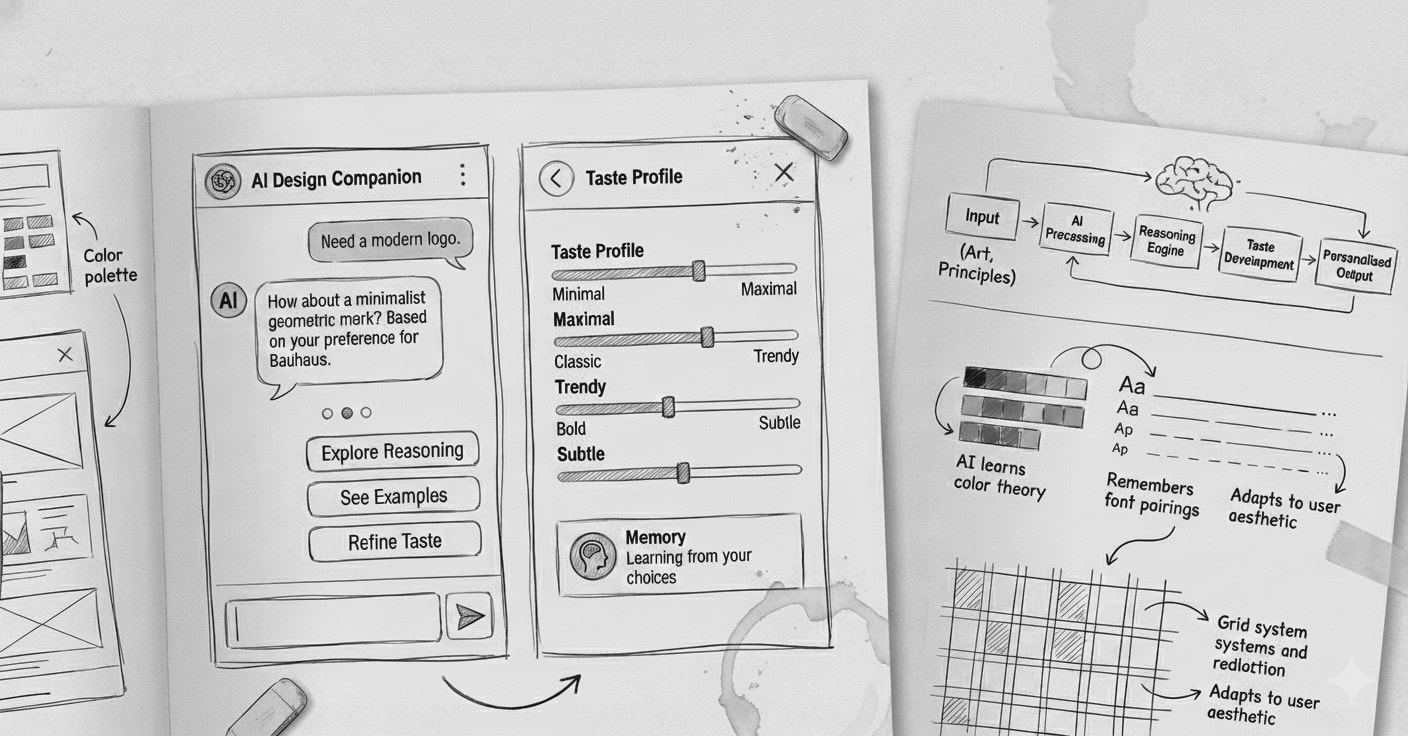
The Problem With Current AI Design Tools
AI design tools generate mockups in seconds. But design isn't output. It's reasoning.
The valuable part isn't the visual. It's:
- Why a decision was made
- Which principles guided it
- How that intent stays consistent across iterations
- How taste evolves over time
Most AI tools compress that thinking into a black box. You get a mockup, but you lose the reasoning that produced it.
I wanted to explore a different approach.
Why Design Is the Right Place to Learn Agents
My work sits at the intersection of technology and art.
In the art world, value is rarely created through automation alone. It emerges through intent, principles, context, and human judgment accumulated over time. That tension makes art a difficult but meaningful space to apply AI.
Art and design expose weaknesses in naive AI systems. They require:
- Context sensitivity
- Respect for tradition and principles
- Taste that cannot be hardcoded
- Adaptation without losing identity
- Reasoning that can be explained
By building in this domain, I can learn how agents:
- Balance rules with preference
- Learn from subtle human feedback
- Maintain continuity across sessions
- Operate under aesthetic and ethical constraints
This case study documents a speculative product I'm using as a learning ground for building AI agents that can reason, remember, and evolve taste. Using design as the medium.
What Designers Actually Struggle With
Despite having powerful tools, designers still face fundamental problems:
- Turning a vague idea into structured flows
- Applying abstract principles consistently
- Maintaining coherent taste across screens and projects
- Explaining design rationale to teammates and stakeholders
- Keeping design intent intact when moving from exploration to execution tools
These aren't tool problems. They're reasoning problems.
The Core Idea
A conversational design studio where a designer can talk, reason, and design simultaneously, while the system maintains structured design artifacts in the background.
Not a tool that generates designs for you.
A thinking partner that:
- Reasons with explicit principles
- Learns your taste through interaction
- Maintains continuity across sessions
- Produces explainable decisions
- Preserves design intent from exploration to execution
How It Works: A Concrete Example
Let me show you what this looks like in practice.
Designer: "I need a file upload experience that feels calm and trustworthy, not stressful."Agent: "I'll apply an architecture-inspired lens. In architecture, calm spaces have clear entry points, predictable progress, and easy exits. For your upload flow, that translates to:- A single, prominent drop zone (stable entry point)
- Persistent progress indication (orientation during the process)
- Clear cancel/restart options (escape paths)
- Minimal visual noise during the wait state (reducing cognitive load)
Here's a three-screen flow: [generates wireframes on canvas]
Would you like to see how this compares to a minimalism-driven approach, or should we refine this direction?"
Designer edits the spacing on the progress screen directly on the canvas, increasing it from 16px to 32px.Agent: "Noted. You prefer more breathing room in wait states. I'll suggest larger spacing in similar contexts going forward."Designer: "Good. But I want file previews before upload, not after."Agent: "That changes the flow to four screens. Previews become the verification step before commitment. Updated: [adjusts wireframes and flow diagram]This adds a decision point. Should users be able to remove files at the preview stage, or only after upload?"
The conversation continues. The structured artifacts (flow diagram, wireframes, component specs, rationale) update in real time. Both visible, both editable, both learning signals.
The Experience
The interface is split into three synchronized areas:
1. Conversation Panel
Natural language collaboration and reasoning. This is where high-level thinking happens.2. Design Canvas
A live wireframe board that updates as the conversation progresses. Direct manipulation here also feeds back into the conversation. Edits become preference signals.3. Structured Artifacts
Always updated, always exportable design outputs:- Goals and constraints
- Information architecture
- User flows
- Screen list with states
- Wireframe layout trees (auto-layout structure)
- Component map and variants
- Microcopy (loading, empty, error, success states)
- Design rationale and principle checklist
- Taste profile and preference signals
Designers can work through conversation or direct canvas editing. Both paths teach the system.
Principle-Driven Reasoning
Instead of training on "good looking designs," the system uses explicit principle lenses.
Each lens is a reasoning framework, not a style.
Examples of Lenses
Architecture-Inspired Spatial Thinking - Stable orientation points become persistent navigation anchors - Courtyards become calm "home states" that organize the product - Verandas become preview or transition states between major actions - Shading becomes controlled information density to reduce cognitive load - Ventilation becomes clear information flow and escape pathsProportional Systems - Golden ratio and modular scales - Harmonic spacing relationships - Visual weight distribution - Hierarchical clarity through proportionMinimalism and Restraint - Progressive disclosure - Essential-only UI elements - Cognitive load reduction - Clarity through subtractionGrid Discipline and Typography - Baseline grid alignment - Typographic hierarchy - Vertical rhythm - Reading flow optimizationWhat Each Lens Defines
- Intent: What problem does this principle solve?
- Rules: How does it translate into UI decisions?
- Context: When does this lens apply?
- Evaluation: How do we measure if it worked?
This structure lets the agent explain its decisions instead of hiding behind taste.
The goal isn't visual imitation. It's conceptual translation. Architecture doesn't look like UI, but the thinking patterns transfer.
How Taste Learning Actually Works
Taste isn't declared upfront. The agent builds a taste profile through observation.
Learning Signals
Strong positive signal: You accept a suggestion without editsPreference refinement: You accept but adjust spacing, hierarchy, or density. The system learns your specific valuesNegative signal: You reject outrightStrong negative signal: You undo after acceptingHow It's Stored
These signals build a probabilistic preference model. Not "this designer likes minimal design" but "this designer tends toward 24px spacing in wait states, tighter spacing in data-dense views, and rejects ornamental elements 80% of the time."
The model is context-aware. Your spacing preference for a dashboard might differ from a marketing landing page.
Example
If you consistently increase spacing when the system suggests 16px, it learns your baseline is closer to 24px. Next time it suggests spacing in a similar context, it starts at 24px.
But if you keep 16px spacing in a different context (say, a compact data table), it learns that density matters here. Context shapes preference.
Taste becomes a probability space, not a label.
How the System Actually Works
Architecture Overview
Base Model: Claude (or similar LLM with strong reasoning capabilities)Context Engineering Approach: Retrieval-augmented generation with project-specific context rather than custom trainingThree Core Components
1. Reasoning Agent - Clarifies intent and constraints through conversation - Applies chosen principle lens to design problems - Generates flows, screens, and layout reasoning - Produces human-readable rationale for every decision2. Memory and Preference System - Stores accepted decisions with context - Logs rejected options and why (when available) - Tracks edits, undos, and adjustment patterns - Maintains project context across sessions - Retrieves relevant past decisions using vector embeddingsTaste signals are stored as:
{
  context: "wait_state_screen",
  property: "spacing",
  suggested_value: 16,
  accepted_value: 32,
  timestamp: ...,
  confidence: 0.8
}
Over time, these build a preference profile that weights future suggestions.
3. Execution Layer Maintains a structured intermediate design specification: - Layout trees (auto-layout style hierarchy) - Spacing and typography tokens - Component definitions and variants - State variants for key screens (empty, loading, error, success)This spec is what drives the live canvas and enables export.
Data Structure Example
The intermediate spec might look like:
json
{
  "screen_id": "file_upload_progress",
  "layout": {
    "type": "stack",
    "direction": "vertical",
    "spacing": 32,
    "children": [
      {
        "type": "component",
        "name": "progress_indicator",
        "variant": "uploading"
      },
      {
        "type": "text",
        "content": "Uploading 3 of 5 files...",
        "style": "body_large"
      }
    ]
  },
  "rationale": "Architecture lens: persistent progress indication provides orientation during a wait state. Increased spacing (32px vs default 16px) aligns with user's preference for breathing room in non-interactive moments.",
  "principle_lens": "architecture_spatial"
}
This representation matches how designers think, not how Figma stores nodes.
From Thinking to Execution
Exploration happens outside execution tools.
The system maintains an intermediate representation that preserves design intent. When you're ready to move to production:
Figma Export Process: 1. A Figma plugin reads the structured spec 2. Translates layout trees into frames and auto-layout 3. Generates components with proper variants 4. Applies spacing and typography tokens 5. Attaches rationale as documentation inside the fileConstraints and hierarchy are preserved. The thinking that produced the design travels with it.
This separation keeps exploration fluid and execution precise.
The Competitive Landscape
Tools like v0, Galileo AI, and Figma AI generate designs from prompts. But they optimize for output speed, not reasoning depth.
What's missing:
- Transparent, principle-based reasoning
- Cross-session taste learning
- Synchronized conversation and canvas editing
- Structured artifacts that preserve intent
- Design rationale as a first-class output
Could existing platforms build something similar? Yes. But their incentives push toward broad, fast tools. This explores a different direction: depth, reasoning quality, and individual taste adaptation.
What Could Go Wrong
I'm not pretending this is solved. Here are the real risks:
The Taste Learning Might Overfit
If the agent sees you increase spacing three times, it might assume you always want more spacing, even when you don't.
Mitigation: Probabilistic modeling with confidence scores, explicit context awareness (dashboard vs landing page vs marketing site), and the ability to override with explanation that becomes a strong training signal.The Principle Lenses Might Feel Forced
Not every design problem maps cleanly to architectural thinking or proportional systems. Some decisions are just practical.
Mitigation: Multiple lenses to choose from, the ability to work without a lens when appropriate, and letting designers say "ignore the lens here, this is just functional."Conversation Is Slower Than Direct Manipulation for Iteration
If you want to try five spacing variations, typing five prompts is tedious.
Mitigation: Direct canvas editing as a first-class input method. The conversation serves high-level reasoning; the canvas handles rapid iteration.The System Might Drift From Designer Intent
If the agent is maintaining artifacts in the background, you might lose track of what it's doing.
Mitigation: Always-visible artifacts, clear change tracking with highlights for what just updated, and undo at every level (conversation, canvas, individual artifact changes).Memory Retrieval Quality
Finding the right past decisions to inform current suggestions is hard. Too much context creates noise. Too little loses valuable patterns.
Mitigation: Semantic search with vector embeddings, time-decay weighting (recent preferences matter more), and explicit context markers (this decision applies to "all wait states" vs "just this project").What Success Looks Like
Early validation focuses on reasoning quality, not aesthetics.
For Reasoning Quality
- Designers can explain why a design decision was made, using rationale the agent provided
- Principle applications feel appropriate, not forced
- Fewer "I don't know why it's designed this way" moments in stakeholder reviews
- Engineers receive clearer design specs with context
For Taste Learning
- By session 3, the agent's first suggestions match designer preference 60%+ of the time
- Designers stop needing to correct the same things repeatedly (spacing, hierarchy patterns)
- Taste signals generalize appropriately. Spacing preferences apply in similar contexts but not everywhere
- The agent can explain its suggestions: "I'm suggesting 32px here because you typically prefer more space in wait states"
For Productivity
- 30% faster from vague idea to structured flow
- 50% less time explaining design rationale to engineers and stakeholders
- Design system consistency improves. Fewer one-off decisions that break patterns
- Onboarding new designers to the system's taste profile takes hours, not weeks
For the Companion Feeling
- Designers refer to it as "we" not "it"
- They return to it for thinking, not just execution
- They feel comfortable disagreeing with its suggestions
- The interaction feels collaborative, not directive
Validation Approach
Methods:
Concept walkthroughs with senior designers to pressure-test the reasoning modelRapid interactive demos with a functional prototype and live canvasA/B preference experiments where designers choose between agent-generated options, teaching the system their tasteLens evaluations to test whether principle translations feel meaningful or forcedMulti-session testing to see if memory and continuity actually work across daysMVP Scope
The first version will be deliberately narrow:
- Chat-based flow and wireframe generation
- One principle lens implemented deeply (likely architecture-inspired spatial reasoning)
- Small preference memory that adapts suggestions within a single project
- Exportable structured spec (JSON)
- Manual Figma export (copy/paste the spec into a plugin)
Focus is learning how designers think and iterate, not producing pixel-perfect UI.
Success means proving:
1. The conversation + canvas interaction model works
2. Principle-based reasoning is more valuable than style-based generation
3. Taste learning from implicit signals is possible
4. Designers want this kind of thinking partner
Next Steps
Choose the first lens: Architecture-inspired spatial reasoning feels most differentiated and translatableBuild the intermediate spec schema: This is load-bearing. Needs to be flexible for exploration but structured for executionPrototype the live canvas renderer: Needs to update smoothly as conversation progresses, handle direct edits, and highlight changesImplement basic memory system: Start with simple preference storage (spacing, density, hierarchy patterns) before building complex retrievalDesign the taste learning loop: How do implicit signals (edits, undos) get weighted and stored? How do they influence suggestions?Build Figma export plugin: Even if manual at first, prove the spec can translate cleanly to production-ready componentsFind 2-3 design teams for validation: Preferably teams with documented design systems who struggle with consistency or rationale captureWhat I'm Looking For
I'm looking to validate this with 2-3 design teams or individual designers who:
- Have documented design systems or principles
- Struggle with design consistency or rationale capture
- Are willing to try an experimental tool and give candid feedback
- Can commit to 3-5 sessions over a few weeks
If this sounds like you, or you're working on adjacent problems (agent memory, design tooling, reasoning systems, context engineering), let's talk.
Long-Term Vision
The goal is a system that maintains a designer's intent the way a sketchbook does. With memory, structure, and the ability to execute when needed.
But first: proving the core loop works with real designers.
---
I'll be documenting progress on this exploration. Follow along if you want to see how this evolves.Reach out: [your contact]